Showing posts with label code. Show all posts

Sunday, July 13, 2014

Rebuilding the laser scanner with iOS AV Foundation framework

At my day job, we have all of these splendid rugged PDA's with laser barcode scanners built-in. Fastest scanners in the West... great experience... until you look at the screen. Yeah, these things are running Windows Mobile. Sadly, though Android is finally becoming more popular, most of these devices still run some flavor of Windows CE. Scanner sleds are available for the iPhone and iPad, but they're expensive. I've never tried one and I'm not all that sure how well they integrate.

The processors on these modern devices are spectacular and there's camera optimizations and all that which make taking pictures literally a snap, so why not use that? There's plenty of scanner apps out there and some that integrate scanning into forms (I remember trying FormMobi and being pretty impressed with the results). Most apps take scanning to the full screen- like you hit the scan button, it goes to a full screen camera window, and then when you hit the barcode it takes you back to the data entry screen or wherever. I was curious as to how fast and how well things would work if the scanner's "laser" was in a peripheral view, like a separate window that represented looking over the screen of one of these ancient Windows Mobile rugged PDA's to see the red of the laser hitting the paper.

I'm quite indebted to Torrey Betts for providing a great code example of how to get started with using Apple's AV Foundation framework for reading barcodes. The framework is not quite as fancy as the Red Laser SDK, but I'm not quite ready to spend a few thousand on this. Anyway, I started with almost all of his code. I created my view on more storyboard with a child view within the top half. That would be the view for the camera output. Then a label to show what was last scanned, a text view for the scanning history (could be a table view or a whole entry form someday), and a button that would become the scanner trigger. I'm sure there's better ways to do this, but I got scanner trigger-like behavior by showing the camera view on the "touch down" event for the button, and removing the view upon "touch up inside" or "touch up outside". The result was that the user would push down the button and the scanning/ camera view would appear, and when they removed their finger from the button, the view would disappear. Additionally, whenever the view registers a valid barcode, the view disappears, requiring another press down of the Scan button. Thus, it's just like the trigger on my old rugged PDA.

 Here's all the special sauce I added:
     // if it found a barcode  
     if (detectionString != nil)  
     {  
       //update the label and history  
       self.lastScannedLabel.text = detectionString;  
       NSString *updatedHistory = [detectionString copy];  
       updatedHistory= [updatedHistory stringByAppendingString:@"\n"];  
       self.historyTextView.text = [updatedHistory stringByAppendingString:self.historyTextView.text];  
       //remove the barcode view  
       [_session stopRunning];  
       [self.prevLayer removeFromSuperlayer];  
       highlightViewRect = CGRectZero;  
       break;  
     }  
     else  
       self.lastScannedLabel.text = @"(none)";  
   }  
   _highlightView.frame = highlightViewRect;  
 }  
 //start scanning when the Scan button is pushed down (touch down)  
 - (IBAction)startScanning:(id)sender {  
   if(![self.session isRunning])  
   {  
     [self.barcodeScanAreaView.layer addSublayer:_prevLayer];  
     [_session startRunning];  
     [self.barcodeScanAreaView bringSubviewToFront:_highlightView]; //isn't necessary at this point because the line gets removed before anyone sees it. Could be useful if there was a delay before shutting down the view and recording the scan  
   }  
 }  
 //stop scanning when the button is pushed up (inside button) (touch up inside)  
 - (IBAction)stopScanning:(id)sender {  
   if([self.session isRunning])  
   {  
     [_session stopRunning]; //this makes the camera stop streaming to the screen.  
     [self.prevLayer removeFromSuperlayer]; //this makes the view containing the camera image go blank  
   }  
 }  
 //stop scanning when the button is pushed up (outside button) (touch up outside)  
 - (IBAction)stopScanning_Outside:(id)sender {  
   if([self.session isRunning])  
   {  
     [_session stopRunning];  
     [self.prevLayer removeFromSuperlayer];  
   }  
 }  
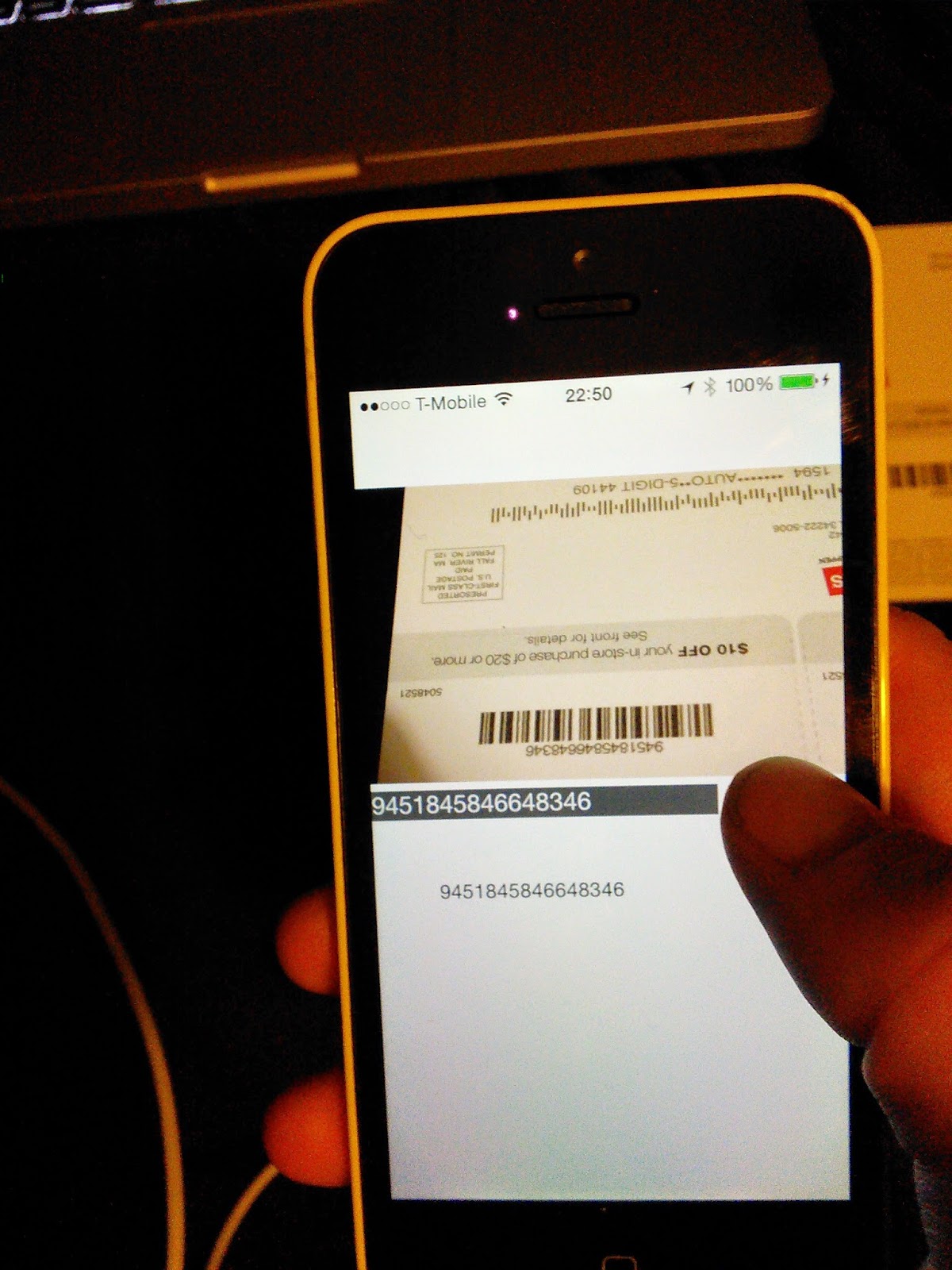
The whole thing is quite hastily-made, but I was quite encouraged that I could get that far in about an hour.  And the camera view appears and disappears quite quickly, even on my "old" iPhone 5C.  These rugged PDA's days are numbered...

Here's the git repo if you'd like to take a peek.

Monday, June 30, 2014

Code: Win at fantasy baseball with Python


I really wanted to play fantasy baseball this year, and of course nobody invites me to their league, so I decided to commission one.  I'm a stats geek and I just couldn't go with Yahoo's default suggestions for scoring, so I added a few of my own.  One I'm really coming to regret is innings pitched (IP).  Everybody else in my league is totally dedicated to their craft, so they're swapping pitchers on and off their benches just in time for their scheduled states, killing me in IP.  I always think of this stuff around 8 PM, after the guy has already been pitching for an hour and when Yahoo will not let me make any more changes.

I thought, what if there was an app that notified me when one of the pitchers on my fantasy team was set to pitch that day.  It would notify me several hours ahead of time, so I can then swap that pitcher in.  Even in a non-IP scoring league, that could be useful if you had several good pitchers and wanted to play them all to rack up strikeouts or wins.

The start of this, is, of course, how do you find out who's pitching that day.  I don't see any web services devoted to that, but plenty of web sites from major sports news sources.  I had just learned how to pick out parts of HTML trees with a Python library called Beautiful Soup.  So I figured that if I could find a site that was pretty easy to parse, I could make a service out of that.  I googled "pitching schedule" and clicked on the first link.


Gee, looks like a bunch of tables, huh?  So if I could just find some CSS classes that indicated where the headings vs. the data were, then maybe I'd have something.  When I opened the source code of the page I found just that.

Basically, the team headings (i.e., the "Texas Rangers at Baltimore Orioles" above) had their own unique CSS class called "stathead". I could tell Beautiful Soup to find all the tr's with that class, then I could find the data underneath each one of those by navigating the tr.'s until I got the one I wanted (4 for the first pitcher and 5 for the second).

 import feedparser  
 from pyquery import PyQuery as pq  
 from lxml import etree  
 import urllib  
 import urllib2  
 from bs4 import BeautifulSoup, NavigableString  
 from urllib2 import urlopen  
 import csv  
 base_url = ("http://espn.go.com/mlb/probables")  
 soup = BeautifulSoup(urlopen(base_url).read())  
 teamsHeadings = soup.findAll("tr", attrs={"class": "stathead"})  
 for t in teamsHeadings:  
  teams = t.find_next("td")  
  print "Teams: " +teams.string.strip()  
  _time = teams.find_next("td")  
  print "Time: " +_time.string.strip()  
  firstPitcher = teams.find_parent("tr").find_next("tr").find_next("tr").find_next("tr").find("td").find("a")  
  secondPitcher = teams.find_parent("tr").find_next("tr").find_next("tr").find_next("tr").find_next("tr").find("td").find("a")  
  print "Matchup: " + firstPitcher.string.strip() + " vs. " + secondPitcher.string.strip()  
  print ""  

I just did simple test output.  It wouldn't be hard to turn this into XML or JSON and make something out of it if I was sufficiently motivated to field a decent fantasy team.


PS: I really recommend Homebrew if you're going to use Python on a Mac.  Made it way easier to get extra libraries going.  Also, http://krillapps.com/coderunner/ makes it way easier to test my scripts.  Now I don't have to remember all those virtual environment incantations.